

When responses are slow, it is tempting to send another reminder. First check whether the request gives people enough information to answer.
These seven changes are not a guaranteed increase in response rates. They are practical ways to reduce the work involved in understanding the request and entering availability.
1. Lead with the purpose and duration
“We need a meeting” does not explain how much time to reserve or what it is for. Try “A 30-minute video call to choose the next version of the proposal.”
If attendance is optional, say so. For a social event, location and budget may also affect whether someone can commit.
2. Offer a manageable set of options
As a starting point, consider around three options for a one-to-one meeting or three to five for a group. These are working guidelines, not statistically proven ideal numbers.
Spread the options across days or time windows instead of offering several neighboring slots that share the same conflict. Known constraints matter more than reaching a target number. See how to choose candidate dates.
3. Give a clear response deadline
“Whenever you have time” is easy to postpone. Give a specific date, time, and time zone, leaving enough room to confirm arrangements before the meeting.
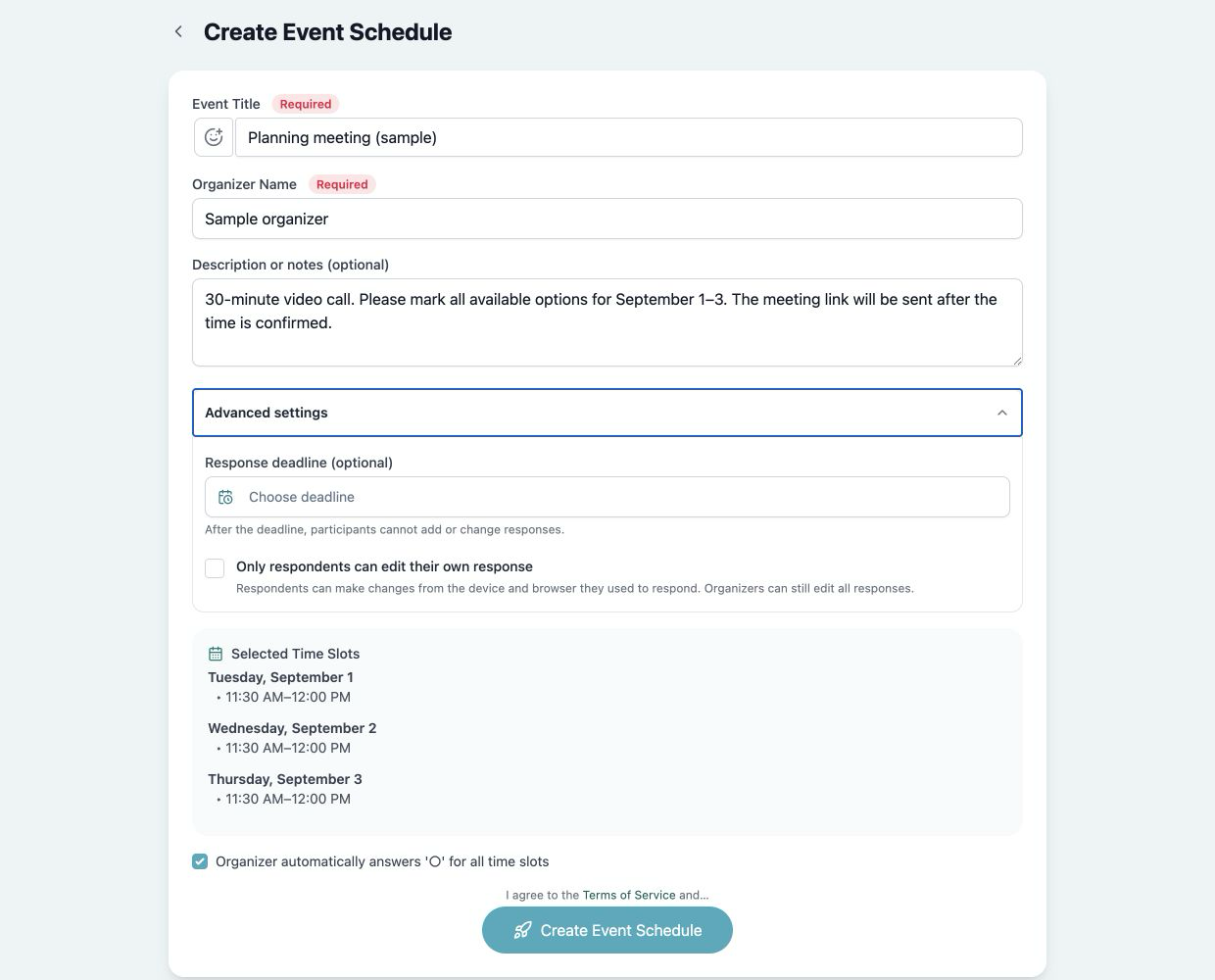
Kantankoho's creation form includes an optional response deadline under advanced settings.
 View full-size image (new tab)
Sample information on the real creation screen. Once a configured deadline passes, participants cannot add or change responses.
Make sure the written deadline matches the setting on the response page.
4. Explain what to enter and what tentative means
Distinguish “mark all options you can attend” from “choose your favorite time.” Finding a common slot usually requires a response for every option.
Define tentative as uncertain or conditional, with an optional short comment explaining the practical condition. Do not pressure someone to mark themselves available when they do not yet know.
5. Keep the link visible and offer a fallback
Place the participant URL on its own line. Open the page on the type of device participants will use and check that the instructions and controls are readable.
Some organizations block external tools. Allow an email reply where appropriate. If an organizer enters a response on someone's behalf, use what that person actually provided rather than guessing.
6. Remind only when needed
Check who has already answered before following up. A brief message near or after the deadline may be useful; repeatedly asking the whole group creates unnecessary work.
Kantankoho's response-count email is an organizer notification, not an automatic reminder sent to participants. Use the reminder templates when a manual follow-up is needed.
7. Explain what happens after a response
Tell participants that the organizer will announce the final time. An available response does not itself confirm a meeting.
We need a 30-minute video call to decide [topic].
Please respond to every option by
[date and time, time zone]:
[Participant URL]

Use tentative if your availability is uncertain or conditional.
A short comment is welcome. If the page does not open,
reply to this message instead.

I will send the confirmed time and meeting link
once the responses are in.
If many people say none of the options work, the solution may be revising the meeting constraints, not sending more reminders. Treat missing responses and incompatible availability as different problems.